Case Study

AI‑Powered
Document Tool

Understanding how employees expect to find and learn how to use an internal AI tool for summarizing documents.

Internal Tools / AI

4 Weeks

UX Researcher

UX Designer, Product Manager, Developer


Overview

Before launching an internal AI tool that summarizes and interacts with uploaded documents, the team wanted to understand how employees expected to find and use it. Because it lived alongside other similar, internal AI tools, there were questions around discoverability and feature comprehension.

My role was to gather user feedback around where users naturally look for AI tools, how they interpret these tools' purposes, and how easily they can complete key tasks such as uploading documents and navigating the interface.


Research Goals

What We Set Out to Learn

Goal 01
Tool Discoverability
Where do users expect to access this suite of AI tools? Is the current entry point intuitive, or does it require hunting?
Goal 02
Tool Differentiation
Do users understand the difference between the various AI tools? Can they identify which tool to use for which task?
Goal 03
Core Task Usability
How easily can users upload documents and interact with the summaries?
Goal 04
First-Time Expectations
What do users expect the tool to do before they've used it? Does the landing page set accurate expectations?

Approach

Exploring How Users Discover and Use the Tool

Participants
8
Timeline
4 weeks
Method
Usability testing

We recruited 8 employees, most of whom had prior experience with AI tools like ChatGPT or Copilot. Their common use cases included editing writing, reviewing documents, searching for information, and planning tasks — giving us a strong baseline for evaluating expectations.

First, users were given a description of the tool and asked where they expect to find it and what they expected it to be called. Users were then given tasks using the tool (uploading documents, switching views, and resizing) and asked for their feedback.
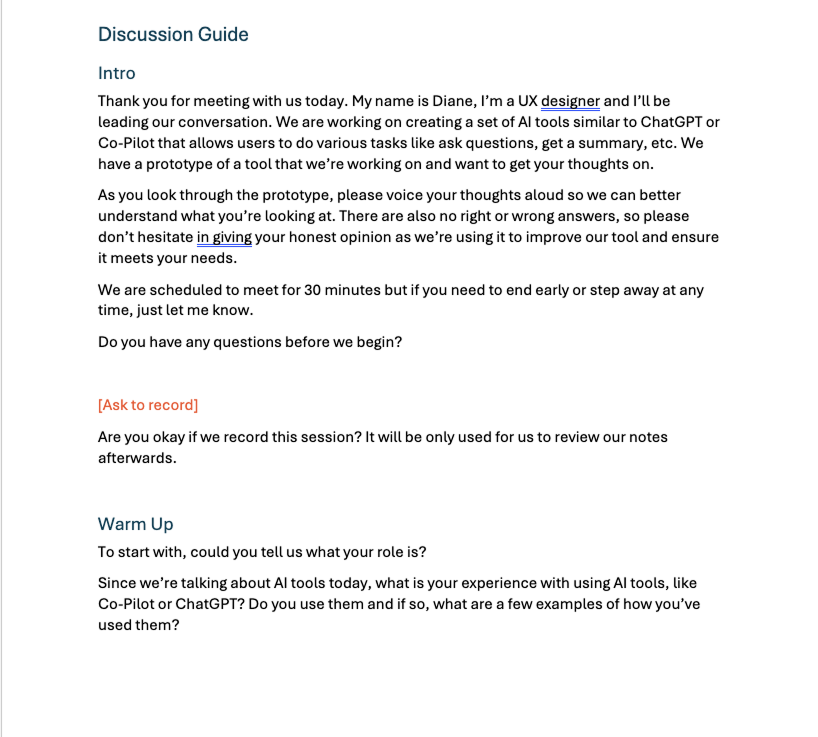
Discussion guide

Research script used during sessions.

Example test session

Example usability test session with a participant.


Key Findings

What Users Revealed

1

Users Struggled to Understand the Tool's Purpose from Its Name Alone

Many participants couldn't infer what the tool did based on its name, leading them to misclassify it as storage, transcription, or general document help. This created early friction and uncertainty about where to upload documents.

2

Discoverability Depends Heavily on Clear Entry Points

While the waffle menu ultimately made sense, only half of users guessed it correctly. Because the menu shows different tools for different people, relying on it alone risks low visibility.

3

First-Time Users Need More Context to Feel Confident

The landing page communicated security and simplicity, but several users wanted clearer explanations of what the tool does and how to get started.

4

Core Tasks Like Uploading Documents Were Intuitive and Successful

All participants completed the upload flow easily and rated it highly. The mental model for "upload → get summary" aligned well with expectations once users understood the tool's purpose.

5

Secondary Interactions Like Resizing Were Not Discoverable

Most users overlooked the resizer bar and tried unrelated controls. Once found, the feature made sense, but its visual affordance was too subtle.

4.9/5
Average rating for document upload task — completed successfully by all participants
4.57/5
Overall ease-of-use rating across all participants

Recommendations

What We Recommended

Improve Discoverability of the Resizing Feature
Increase the width of the resizer bar to make it easier to notice and interact with
Use a more noticeable colour to differentiate it from surrounding UI elements
Adjust arrow size for better visibility and affordance
Increase Awareness of DocuChat
Promote the tool through internal communications ahead of launch
Highlight the tool on the company's intranet to improve findability
Consider surfacing it in multiple locations beyond the waffle menu
Enhance First-Time User Guidance
Add clearer, more approachable language on the landing page explaining the tool's purpose
Consider a tutorial or onboarding message for first-time users

Impact

From Study to Launch

This study clarified how employees think about AI tools within the company's ecosystem and revealed key opportunities to improve discoverability, naming clarity, and first-time usability. The findings directly informed design updates ahead of launch and shaped the communication strategy for introducing the tool to the organization.


Next Case Study

Destination Voice Bot

Validating a voice bot for users and uncovering what they needed next.

View Case Study →